 Marketing
10 Practical Marketing Ideas For Small Businesses
You don’t need a huge budget to get your business or brand noticed. Our online marketing ideas for small businesses are designed to maximize ROI.
As a savvy Shopify retailer, you know the importance of creating a seamless and personalized shopping experience for your customers.
One powerful way to achieve this is through Shopify product recommendations. Seriously, studies have shown that up to 35% of Amazon's revenue is generated through its recommendation engine.
Thirty. Five. Percent.
Indeed Amazon is a great example to showcase the immense potential of product recommendations in boosting sales and driving profitability.
But beyond revenue, personalized suggestions also create a better shopping experience for customers.
Done right, you can create a virtuous cycle, where satisfied customers make repeat purchases and become brand advocates, attracting new customers through positive word-of-mouth.
In this article, we will delve into the world of Shopify product recommendations and explore how they can revolutionize your business — backed by real placement data from our Upsell Statistics 2026 report.
Sounds good? Let’s jump in!

Shopify product recommendations are a sales strategy where you use data-driven algorithms to suggest products that shoppers might be interested in.
On a basic level, you can use simple logic to create product recommendations. So, for example, when a customer adds a pair of shoes to their cart, you might suggest a pair of socks to compliment them.
On a more advanced level, Shopify product recommendation engines can leverage data-driven algorithms. They can suggest relevant and personalized products to individual shoppers based on things like their browsing behavior, purchase history, and preferences.
We’ll discuss more about this later, but for now, let’s cover the reasons why you should add recommendations to your Shopify store:
Adding product recommendations to your Shopify store yields numerous benefits for both you and your customers:

The process of generating product recommendations on a Shopify store involves several key steps. If you're just getting started this might sound overwhelming - but don’t worry, we’ll talk about the best tool you can leverage later to manage most of the heavy lifting.
Okay, by now you should understand the basics. But to truly grasp the power of product recommendations, let's take a peek behind the curtain and explore the science that makes them work.
Collaborative filtering is a popular technique used in recommendation systems. It leverages the collective behavior of customers to make predictions about an individual's preferences. The underlying assumption is that customers who have exhibited similar behaviors in the past will have similar preferences in the future.
Two primary types of collaborative filtering exist: user-based and item-based. User-based filtering looks at the behavior of similar users to make recommendations. If two users have a history of purchasing similar products, one user will receive product recommendations based on the other's preferences.
Item-based filtering, on the other hand, compares the similarity between products. If two products have been frequently purchased together, one product will be recommended when the other is viewed.
Machine learning takes product recommendations to a whole new level of sophistication. By leveraging powerful algorithms and vast datasets, machine learning recommendation systems can discern intricate patterns and relationships.
These algorithms continuously learn from customer interactions, enabling them to adapt and improve their suggestions over time.
One of the key advantages of machine learning-based recommendations is their ability to handle more complex scenarios. They can identify subtle correlations between products, offer real-time recommendations, and even predict customer preferences for products they have not interacted with previously.
This level of personalization contributes significantly to enhancing customer engagement and driving conversions.
Ok, now that we know the ‘behind the scenes’ of product recommendations let’s talk about types of recommendations.
Each type serves a different purpose to enhance the shopping journey. Here are some of the most common types:

That thank-you page real estate matters: in real, anonymized data from real Upsell.com stores, the thank-you page is the steadiest placement in the funnel (its traffic barely swings with seasonality), and product recommendations make up roughly a quarter of the widgets shown there — 22.9% of recorded thank-you page widget impressions, next to 75.8% for a single featured upsell product.
On the thank-you page, product recommendation widgets account for 22.9% of what shoppers see — the rest is a single featured upsell.
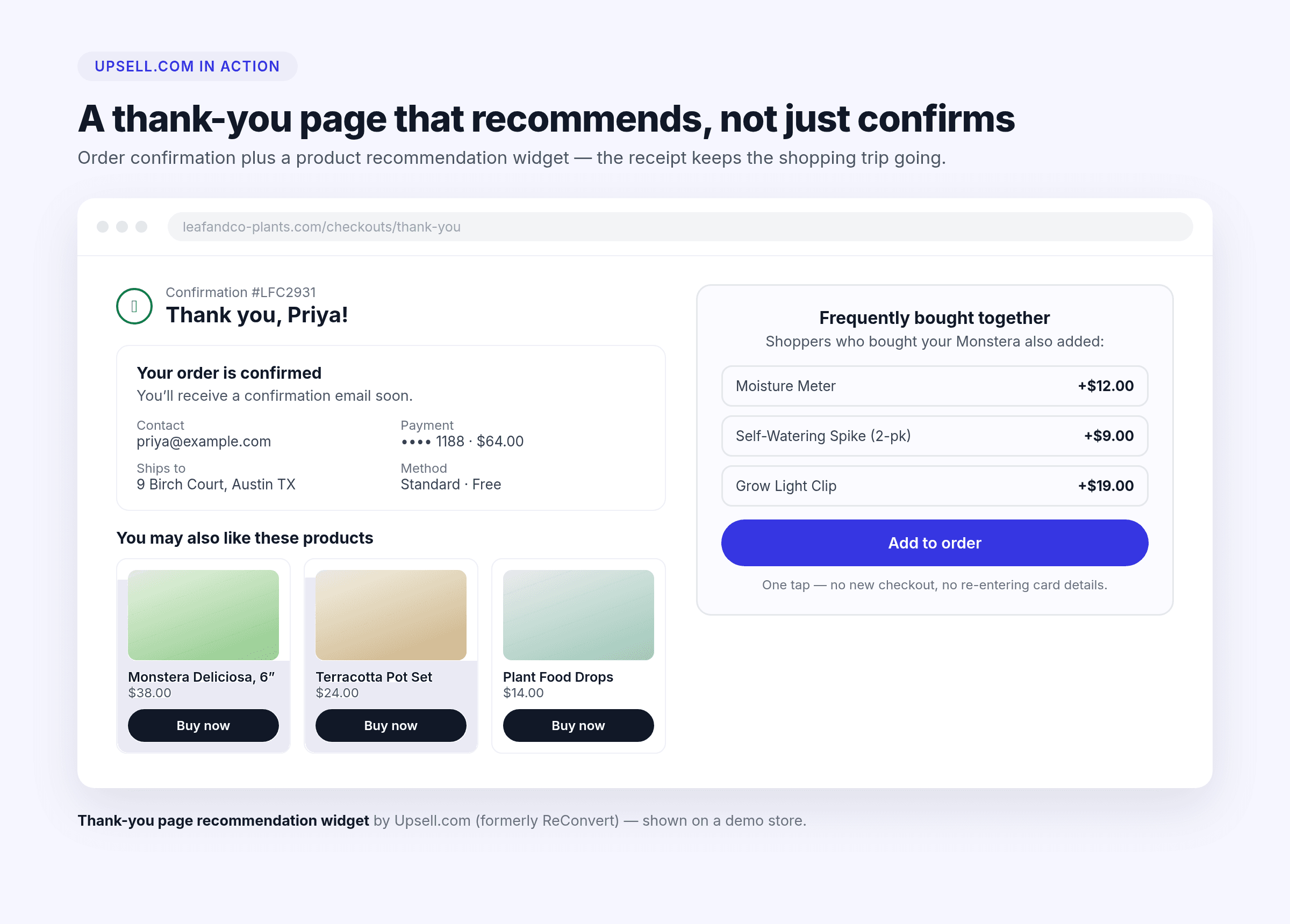


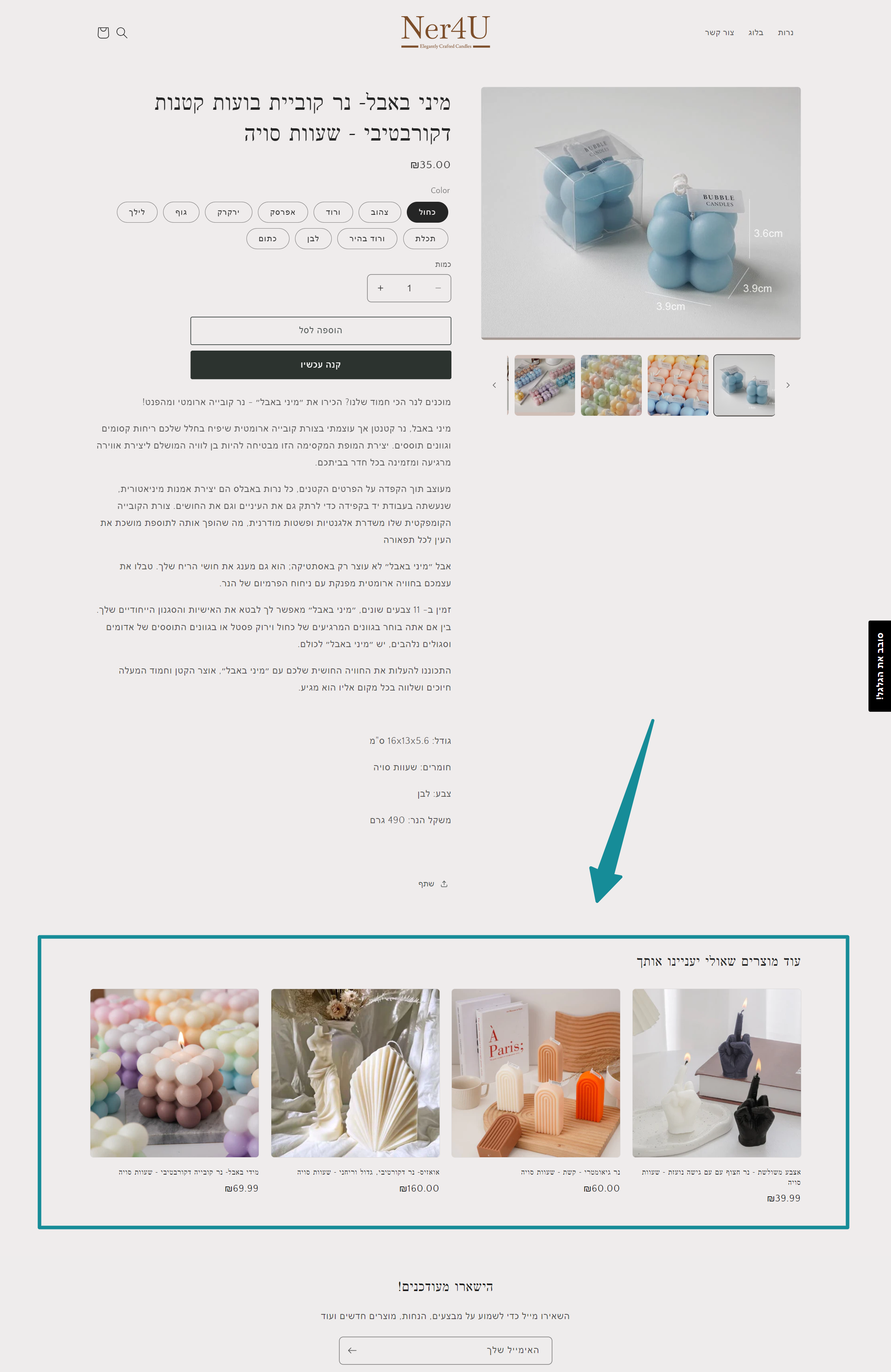
Now that we understand the science behind product recommendations, let's explore how you can seamlessly integrate them into your Shopify store with Upsell.com.
Upsell.com is an app that allows you to trigger personalized recommendations at checkout, between checkout and order confirmation and on your thank you page.
This is by far the easiest (and probably most profitable) way to add product recommendations to your shopify store in under 10 minutes.


Upsell.com helps you increase AOV with targeted offers across the full shopping journey, from product and cart to checkout, post purchase, and beyond.

Step 4: Turn on Upsell.com’s post-purchase offers to show a targeted product recommendation immediately after checkout. Set your discount and you’re live — no theme code required.

Step 5: Congratulations, post-purchase product recommendations are live on your store! From here you can review your analytics to test different types of recommendations. You can also use the editor to customize which products get recommended and where.

Once you’ve installed Upsell.com, it’s time to optimize them for best results. Here’s how:
Carefully consider where to place the product recommendation widget on your store. Common locations include the homepage, product pages, cart page, and checkout page. However, we’ve seen the highest conversion rates with:
See post-purchase product recommendations don’t interrupt the initial buyer’s journey. Introducing too many products pre-purchase runs the risk of overwhelming customers and risks losing the initial conversion. So, as a general rule, the later along the journey you offer additional products, the more conversions you’ll get.
For example, Upsell.com user Tushy moved most of their product recommendations from the pre-purchase journey to the thank you page. They were able to achieve a 2.6% conversion rate and add almost $200,000/mo in additional revenue.
📚Suggested Reading: How Tushy used thank you page cross-sells to generate an extra $191,786/mo.
Different customers have different preferences, so avoid a one-size-fits-all approach. Customize the recommendation settings to target specific customer segments based on demographics, purchase history, and behavior patterns. Tailor recommendations to showcase trending products, bestsellers, or personalized suggestions.
Social proof such as customer reviews and ratings instill confidence in potential buyers. Social proof reinforces the quality and popularity of recommended products, encouraging customers to make informed purchasing decisions.
When you limit your product recommendation offers to the transaction, you’ll give customers more impetus to take action. Use exclusive offers that customers must claim in the moment. For example, a triggered pop-up with a timer is a powerful product recommendation tool that’ll drive your conversion rate even higher.
Adding Shopify product recommendations may come with occasional challenges. Being aware of potential hurdles and knowing how to address them will ensure a smooth customer experience.
Customer data holds the key to unlocking the true potential of product recommendations. Let's explore how to harness this data to deliver even more accurate and relevant product suggestions.
Accumulating customer behavior data is the foundation of an effective recommendation system. The data can be collected through various touchpoints, such as website interactions, purchase history, wishlists, and abandoned carts.
Once you have gathered customer data, it's time to turn that data into actionable insights that power your recommendation engine.
As personalization becomes more sophisticated, customer privacy becomes a paramount concern. Learn how to balance personalization with respecting customer data privacy to build trust and maintain loyal customers.
You've implemented product recommendations, but how do you know if they are truly effective? Let's explore the metrics and strategies to measure their impact and continuously optimize them for better results.

Effectively measuring the impact of your recommendation system requires the use of key performance indicators (KPIs). You can get an overview of your product recommendation performance in Upsell.com’s dashboard. Here’s what to keep an eye on:
Quantitative data from KPIs provides valuable insights into recommendation performance, but it is equally crucial to gather qualitative feedback from customers.
No recommendation system is perfect from the start. Learn how A/B testing can help you identify areas for improvement and refine your recommendations over time, ensuring they deliver the best possible results.
In conclusion, Shopify product recommendations are a game-changer for online businesses with digital products.
By implementing intelligent algorithms and leveraging customer data, you can offer personalized suggestions that boost sales and foster customer loyalty. Remember, success lies not only in the technology itself but also in how you use it to cater to your audience's needs.
Embrace the power of product recommendations, and watch your Shopify store thrive like never before. Use Reconvert to begin personalizing your customers' shopping experience today, and witness the incredible transformation in your business.
To add product recommendations on Shopify, you can utilize various Shopify apps such as Upsell.com. Upsell.com allows you to create triggers and segments based on customer behavior and display relevant product suggestions at checkout and post-purchase.
To include product recommendations on the cart or checkout page of your Shopify store, you can use a recommendation app such as Upsell.com that allows you to customize the placement and design of the widget. The app will automatically display personalized product suggestions based on the items in the customer's cart or other shopping behaviors.
To include product recommendations in Shopify invoice emails, you can integrate a recommendation app that supports email customization such as Wiser. Wiser will analyze the customer's purchase history and include relevant product suggestions in the order confirmation email.
To remove product recommendations from your Shopify store, open the app you used to add them (for example Upsell.com) and turn the relevant widget off from its editor — checkout, post-purchase, thank-you page, and cart recommendations can each be toggled independently. No theme code edits needed.
Product recommendations are personalized product suggestions shown to a shopper based on what they’re viewing, what’s in their cart, or what they just bought. On Shopify they commonly appear on the product page, in the cart, at checkout, and after checkout — on the post-purchase offer and the thank-you page.
Frequently bought together suggests items other shoppers added to the same order — a plant and a moisture meter, say. Related products suggest items similar to the one being viewed, like two different monstera varieties. Both drive AOV; frequently-bought-together tends to read as more relevant because it’s based on actual order patterns, not just category.
Two placements matter most once the order is placed: the post-purchase offer, shown between payment and the thank-you page, and the thank-you page itself. That first takeaway — recommendation widgets are 22.9% of what shoppers see there — is why it’s worth a dedicated widget rather than leaving the page blank.
No. Recommendation apps like Upsell.com (formerly ReConvert) add widgets to checkout, post-purchase, and the thank-you page through an app editor — no theme code required. See our full breakdown of what shoppers actually do once they land on the thank-you page in the thank-you page statistics piece.
MarketingYou don’t need a huge budget to get your business or brand noticed. Our online marketing ideas for small businesses are designed to maximize ROI.
 Marketing
Personalizing your buyers journey is a fantastic way to boost conversions. Discover 6 simple ecommerce personalization tactics to try today.
 Product
ReConvert has officially become Upsell.com. Here’s what’s changed, what stays the same, and what this means for your Shopify store.
Get eCommerce insights that convert
One email a month, practical strategies on conversion, AOV, retention, and customer experience.