Shopify Announcement Bar: Examples, Countdown Timers & Setup
Every Shopify store has some version of an announcement bar: the slim strip at the top of the storefront that carries general deals, promotions, shipping notices and other store-wide messages. This article covers that briefly for context — but it's mostly about a different announcement bar: the one Upsell.com puts on your thank-you page and order status page.
Think of that one as the replacement for a popup. Shopify currently doesn't allow popups on those pages at all — and the announcement bar does the popup's job without being one: it sits sticky at the top of the page where it captures attention, carries a time-limited, auto-applied discount with a live countdown, and travels with the customer as they move on to other pages. Examples, setup, and the data, below.
Shopify announcement bar: key takeaways
An announcement bar is a slim, sticky bar that carries a message, a discount, or a countdown — always visible, never blocking the page the way a popup does.
The storefront announcement bar handles general deals, promotions and store-wide notifications; it stops at checkout.
On the thank-you page and order status page — where Shopify doesn't currently allow popups — Upsell.com's announcement bar does the popup's job: sticky, attention-capturing, with a countdown and an auto-applied next-order discount that follows the customer back into the store.
Those pages matter: in real, anonymized data from thousands of Shopify stores, the thank-you page accounts for 18.5% of all accepted upsell offers — the second-biggest placement overall — and the order status page adds another 2.0%.
Setup takes minutes in the Upsell.com editor — no theme code, no popups.
What is an announcement bar on Shopify?
An announcement bar is the narrow banner pinned to the top of a page. On Shopify it comes in two flavors:
The storefront announcement bar. Most themes include one: a strip for general deals, promotions and notifications — a free-shipping threshold, a holiday shipping deadline, a sale message — set up in the theme editor. It does its job, but it can't follow the customer past the storefront, and in most themes it can't run a real countdown or apply a discount by itself.
The post-checkout announcement bar. This is Upsell.com's version: a sticky bar on the thank-you page and order status page (and pre-purchase store pages, if you want it there) that pairs a message with a time-limited discount and a live countdown — and auto-applies the discount code, so the customer never types a thing. Shopify currently doesn't allow popups on these pages, so the bar fills that role: it captures attention without blocking the order details, and it stays with the customer as they move to other pages.
Why put an announcement bar after checkout?
Because that's where your most convinced audience is. Every customer who pays lands on your thank-you page — it's the one page in your store with a 100% visit rate among buyers. The order status page gets revisited again and again while customers track their delivery, often for days after the purchase.
The numbers bear this out: across thousands of Shopify stores running Upsell.com (formerly ReConvert), the thank-you page accounts for 18.5% of all accepted upsell offers — the second-biggest placement after post-purchase offers themselves — and the order status page adds another 2.0%. (The full placement breakdown is in our 2026 upsell statistics report.)
A shopper on those pages has just trusted you with their card. A time-limited “15% off your next order” with a visible countdown is urgency aimed at someone already in a buying mood — without interrupting the order details they came to check.
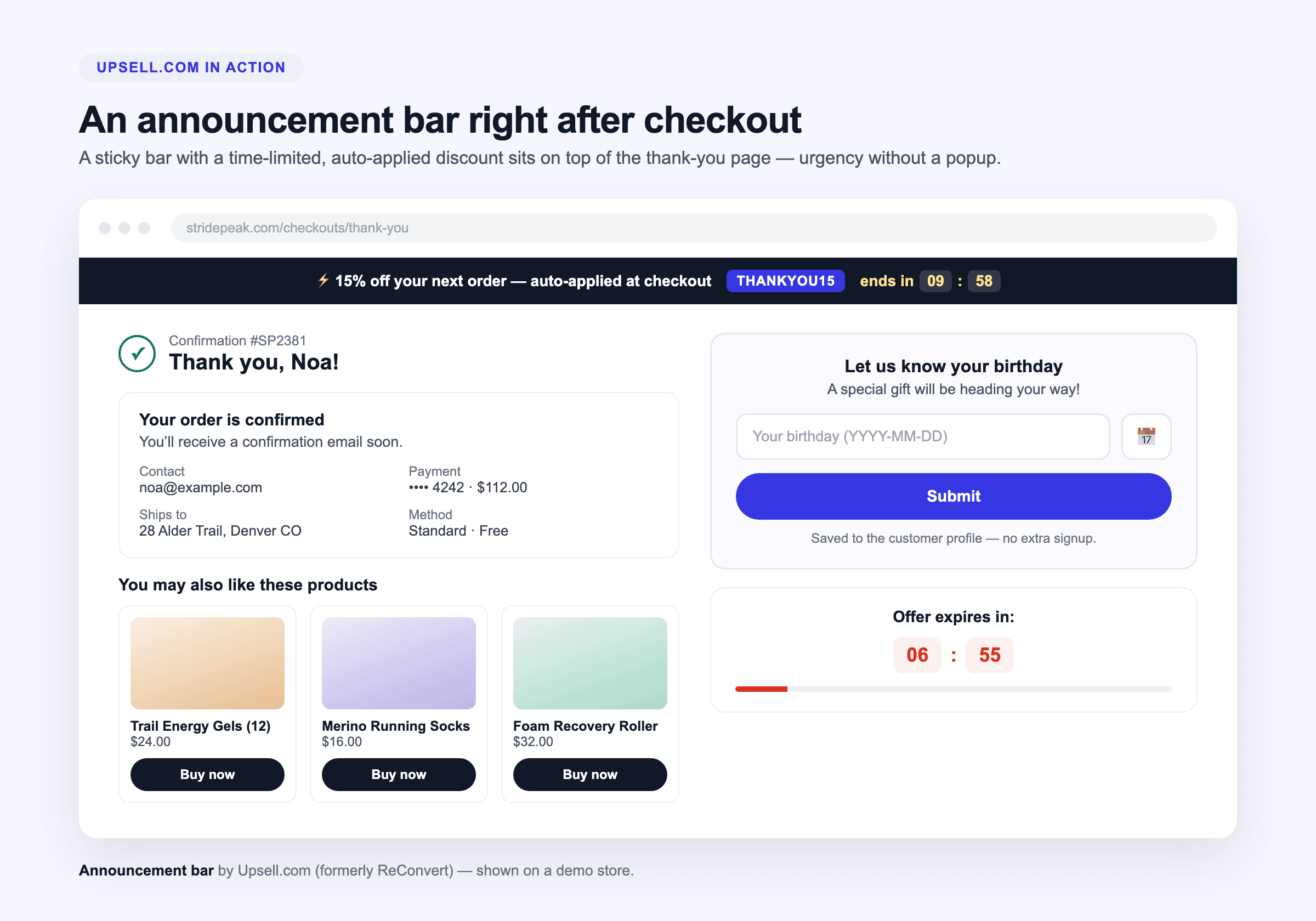
The announcement bar on a demo store's thank-you page — sticky, time-limited, auto-applied.
What the Upsell.com announcement bar does
Time-limited discounts with a live countdown — flash-sale urgency, pinned to the top of the page.
Auto-applied codes — the discount follows the customer back into the store and applies itself at checkout; nobody copies a code off the screen.
Sticky and non-intrusive — it stays visible as the page scrolls, and unlike a popup it never covers the order details customers came to see.
Runs across the journey — thank-you page, order status page, and pre-purchase store pages, so one bar can carry a single offer from the receipt back into your catalog.
Announcement bar examples
Three setups that work, in rising order of ambition:
The next-order nudge. A home-goods store puts “15% off your next order — auto-applied, ends in 10:00” on the thank-you page. Short window, real urgency, aimed at a customer who just proved they'll buy from you.
The delivery-window offer. On the order status page, a customer tracking their package sees “10% off bestsellers this week — applied at checkout.” They may open that page three or four times before the box arrives; the bar is there every time.
The BFCM flash bar. During the holiday rush, one bar carries the sale across the journey: a countdown to the sale's real end, discount auto-applied, the same message on the thank-you page and the storefront. (Our Black Friday upsell checklist slots this in as step 4.)
Most Shopify themes include a basic storefront announcement section for static messages, set in the theme editor. What themes don't do is run a bar after checkout with a live countdown and an auto-applied discount — that's what Upsell.com's announcement bar adds.
Can I put an announcement bar on the thank-you page?
Yes — that's exactly where Upsell.com's announcement bar lives: the thank-you page and the order status page, with the option to run it on pre-purchase store pages too.
Is an announcement bar better than a popup?
On the thank-you and order status pages the comparison is settled for you: Shopify currently doesn't allow popups there at all. The announcement bar is how you get popup-grade attention on those pages — sticky and always visible, without covering the order details — and it follows the customer on to other pages, which a popup never could.
Can the announcement bar's discount apply automatically?
Yes. The discount auto-applies and follows the customer from the thank-you page back into the store — no copying codes, no drop-off at the discount field.
What should my announcement bar say during a sale?
Name the deal, the deadline, and the action in one line: “15% off your next order — auto-applied, ends tonight at midnight.” Specific beats clever, and a visible countdown beats both.
About this data (and how to cite it)
The statistics in this article come from real, anonymized data recorded across thousands of Shopify stores running Upsell.com (formerly ReConvert) between October 2025 and October 2026. Placement figures are shares of offers customers actually accepted, not conversion rates, since no impression-level data exists for this comparison yet. To cite these numbers, link back to this page or to our full 2026 statistics report.
You might also like
Marketing
10 Powerful Ecommerce Marketing Automation Strategies to Drive Sales on Autopilot
eCommerce marketing automation allows you to free up time, provide a better experience, and ultimately, make more sales. Discover 10 simple, but proven eCommerce marketing automation examples you can implement to take your store to the next level.
Marketing
10 Practical Marketing Ideas For Small Businesses
You don’t need a huge budget to get your business or brand noticed. Our online marketing ideas for small businesses are designed to maximize ROI.
Marketing
eCommerce Personalization: 6 Simple Strategies to Skyrocket Conversions
Personalizing your buyers journey is a fantastic way to boost conversions. Discover 6 simple ecommerce personalization tactics to try today.
 Marketing