 Marketing
eCommerce Personalization: 6 Simple Strategies to Skyrocket Conversions
Personalizing your buyers journey is a fantastic way to boost conversions. Discover 6 simple ecommerce personalization tactics to try today.
Shoppers don't read your shipping policy. They read one line - usually tucked into a banner or sitting right inside the cart - that tells them exactly how much more to spend before shipping is free. Get that number right, and visible, and it becomes one of the easiest nudges in ecommerce. Bury it on a policy page nobody opens, and it's just a sentence doing nothing.
It's the same trick Amazon, eBay and AliExpress have trained every shopper to look for: a clear number, close enough to reach, shown right where someone is already deciding what to buy. Let's work out where to set that number for your own store - and where to put it so it actually gets seen.
A free shipping threshold is the order total a shopper needs to reach before you waive the shipping fee. Below it, they pay for shipping; above it, you absorb the cost - usually because you've already built room for it into your margin or your average order value. It works like a bundle discount in reverse: you give up a flat shipping fee, and in exchange, a share of shoppers add one more item to clear the line.
It's become second nature in ecommerce because the biggest retailers trained shoppers to expect it. Amazon surfaces a free-shipping message on product and cart pages. eBay sellers list it as a perk. AliExpress shows a shipping badge before a shopper even opens the listing. The number itself varies by store and changes over time, but the expectation doesn't: shoppers now look for it, and a store that doesn't show one is the exception.
There's no universal dollar figure here - there's a ratio. The starting point most merchants test is roughly 15-25% above current average order value (AOV). Set it lower than that, and too many orders already clear it, so you're giving away shipping for nothing. Set it higher, and the gap feels too far to bother closing - shoppers just pay for shipping, or leave.
Worked example: say your store's AOV is $62. A threshold somewhere in the $70-$78 range asks for roughly $8-$16 more than the average order already spends - close enough that one more item, or a small upgrade, gets a shopper there. Set it at $150 instead, and most carts would need to more than double before shipping is free; shoppers won't stretch that far, so the threshold stops doing any work at all.
A few things worth checking before you lock in a number:
A threshold sitting on a shipping policy page does nothing - almost nobody opens that page mid-shop. It earns its keep the moment the cart is open, because that's exactly when a shopper is deciding whether to add one more thing. Upsell.com's cart drawer puts a live progress bar right there: "Add $X more for free shipping," updating as items go in, with a suggested product one tap away.
The mechanic works because the goal, the gap, and the fix are all visible in the same few seconds the cart drawer is open.
Here's what that looks like in practice - a cart drawer showing the remaining gap to free shipping, next to a one-tap suggestion sized to close it:
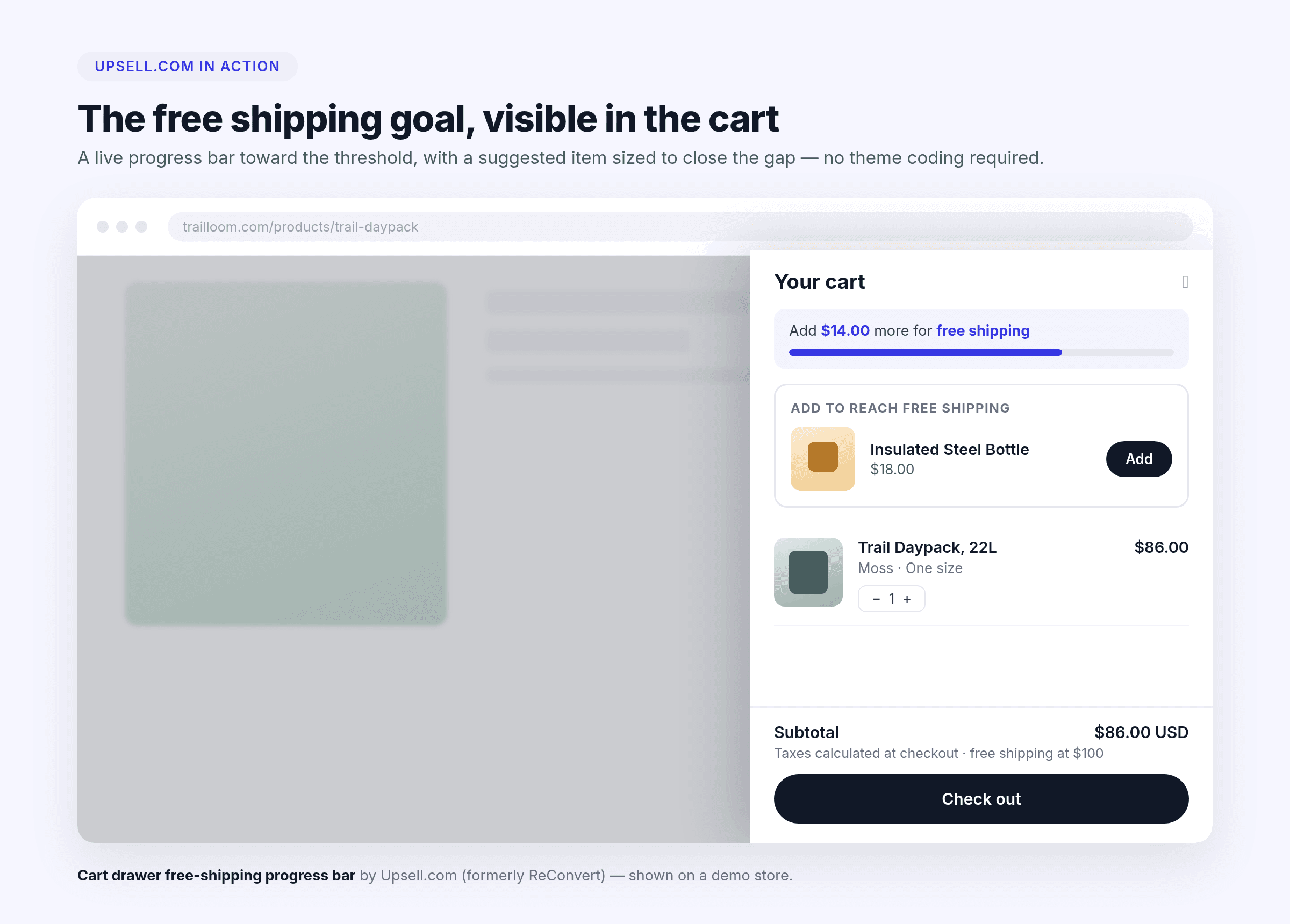
Notice what's doing the work: the dollar amount remaining, not the full threshold - shoppers think in "how much more," not "what's the number" - a bar that visibly fills as items go in, and a suggested product priced to close the gap in one tap. That's the difference between a shipping policy and a nudge a shopper actually responds to.
Once you've picked your number, the mechanics are simple: set the threshold amount, write the one line ("Add $X more for free shipping"), and put it somewhere a shopper sees it while actively deciding to add another item - the cart drawer, not a banner that scrolls out of view at the top of the page. Pair it with a product suggestion close to the remaining gap, the same way you'd handle a checkout upsell or a thank-you page offer: relevant, inexpensive relative to the cart, and one tap to accept.
Upsell.com helps you increase AOV with targeted offers across the full shopping journey, from product and cart to checkout, post purchase, and beyond.
A common starting point merchants test is roughly 15-25% above their current average order value - close enough for a shopper to reach with one more item, high enough that most orders don't already qualify for free.
Amazon, like most large retailers, posts a minimum order total for free shipping on orders outside a paid membership; the exact figure varies by region and changes over time, so check the retailer's own current policy rather than relying on a number published elsewhere.
With Upsell.com (formerly ReConvert), the cart drawer includes a built-in progress bar toward a shipping or discount goal, plus a suggested product to help close the gap - no theme coding required.
The mechanism is straightforward: showing shoppers exactly how much more they need to spend, at the moment they're deciding what to add to their cart, turns a policy into a visible nudge. How much it moves your own AOV depends on where you set the threshold relative to your current average - see the math above.
The threshold math in this article is a general framework, not a statistic drawn from Upsell.com's own conversion data - no fair, store-agnostic benchmark exists for "the right" free shipping threshold, since it depends entirely on each store's margins and catalog. References to household retailers (Amazon and similar) describe their own publicly posted shipping policies, not Upsell.com data, and are general knowledge rather than a cited figure - always confirm against the retailer's live policy page. For real, anonymized conversion data from Upsell.com stores, see our upsell statistics report.
MarketingPersonalizing your buyers journey is a fantastic way to boost conversions. Discover 6 simple ecommerce personalization tactics to try today.
 Marketing
eCommerce marketing automation allows you to free up time, provide a better experience, and ultimately, make more sales. Discover 10 simple, but proven eCommerce marketing automation examples you can implement to take your store to the next level.
 Product
ReConvert has officially become Upsell.com. Here’s what’s changed, what stays the same, and what this means for your Shopify store.