 Marketing
10 Practical Marketing Ideas For Small Businesses
You don’t need a huge budget to get your business or brand noticed. Our online marketing ideas for small businesses are designed to maximize ROI.
1 min read
ReConvert vs AfterSell: they’re some of the biggest and best Shopify upsell apps out there right now.
But unfortunately, you can only use one of them in your store.
And when it comes to ecommerce stores, using the best tools at hand is critical to maximizing your profit.
So that begs the question:
If you can only use one of the apps, which one is the better choice?
Let’s get into it.
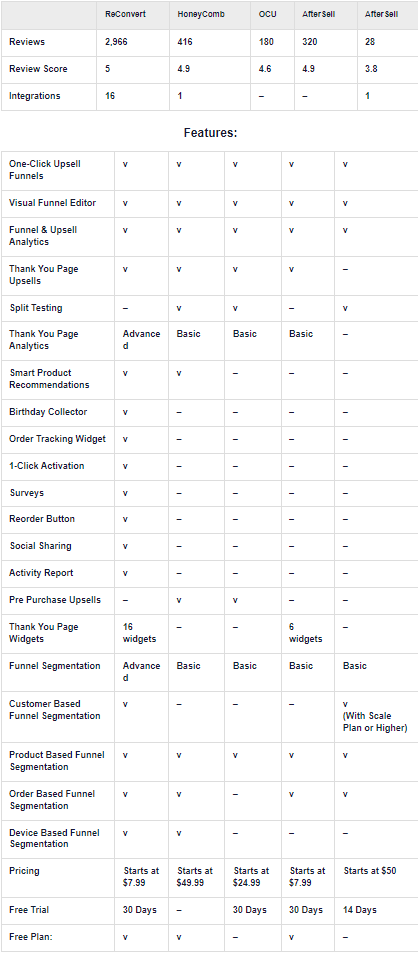
Today we’ll be comparing the apps against each other on the aspects we think are most important for an upselling app.
So let’s start with the features.
Both ReConvert and AfterSell are focused on upselling. So we thought it’d be fitting to start with that.
With that being said, how do they stack up?
Both apps offer one-click offers, thank you pages, and post-purchase upsells, but what matters the most is the depth of customization.
When a store is moving hundreds of products or more per day, it’s vital that the tools it uses can be customized to the smallest details.
So let’s take a look at the customization options for the thank you pages and funnels.
Operating a store at its full potential means you’ll need to customize the funnels to get there in the first place.
So do the editors for each app allow you to get as in-depth as you need?
Let’s check each one out:
ReConvert’s editor is based on a few tenets:
While an easy-to-use interface is great, it doesn’t mean much unless you can still customize your funnels for top-notch optimization.
ReConvert delivers in both of those categories and then some.
It comes with a simple drag & drop UI that allows for easy, quick changes to your funnels whenever you need to, and all of the conditionals a store might need.
There are also a ton of features to implement segmentation across funnels, but we’ll touch on that soon.
AfterSell offers a simple, three-step process to design each funnel.
Overall, it’s intuitive and easy, though lacking a bit of much needed depth.
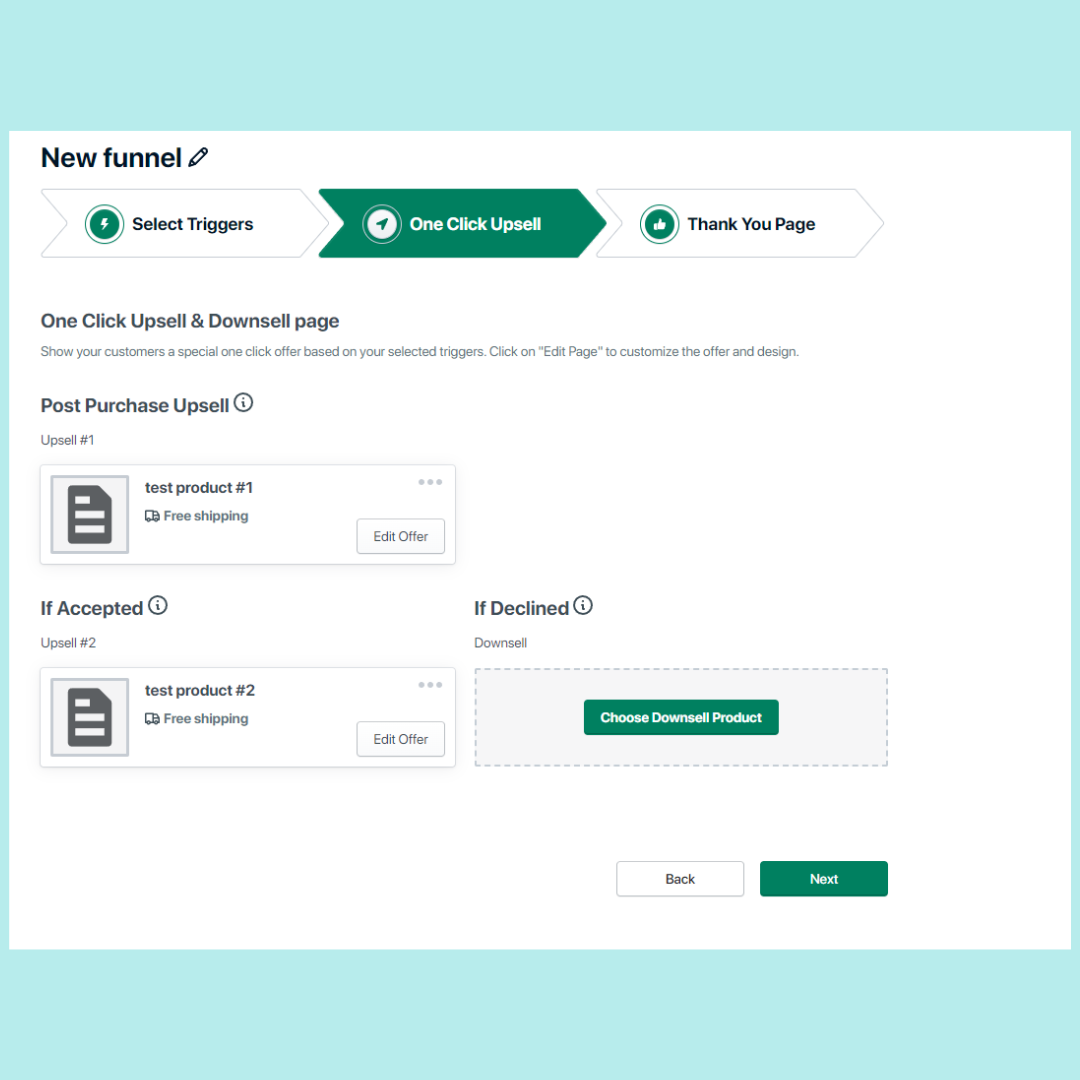
The funnels consist of a simple if-then style of organization. Overall, it’s functional on a basic level, but lacks the level of depth that’s often essential for top-performing stores.
Despite that, the UI isn’t too shabby and didn’t take very long to wrap our heads around.
ReConvert’s thank you page editor is one of its biggest strengths.
It utilizes a UI that mirrors Shopify’s so it’s easy to learn. And when it comes to depth, ReConvert brings 16 different widgets to the table, with order tracking, birthday collectors, timed sales, and more.
ReConvert’s thank you pages are virtually unmatched in the Shopify app store.
AfterSell’s thank you page editor is about as accessible as ReConvert’s but where it falls of is the smaller details.
AfterSell only offers 6 widgets at the time of writing this article, and lacks some of the customization options (and magic designer) that’s included in ReConvert.
Discount management is similarly accessible in each app, but where they really differ is the amount of depth.
Both apps allow for trigger-based discount offers, but ReConvert allows both percentage discounts, flat rates, and more. Ultimately, there are a bit more options when it comes to customization.
Which leads us to our next comparison.
Discounts are great, but how much control do you have over who sees those discounts on these apps?
One of the greatest advantages of digital marketing is that you don’t have to show the same offers to every customer.
You can use data to determine which offer is most likely to resonate with each specific consumer.
Top-performing stores use this to their advantage to create hyper-specific offers for hyper-specific customer segments.
Which means that they’ll need an upsell app that supports that level of segmentation.
So with that being said, how deep do each of these apps go? Let’s find out.
ReConvert allows stores to get as comprehensive as it gets when it comes to segmentation. Here’s a quick list of the possibilities
Using custom funnels, you can show offers to customers based on past purchase data, order value, or even go as deep as offers based on the operating system or device a customer is using at the moment.
Which is to say, since it goes it deep as it gets, ReConvert is hard to beat in this section.
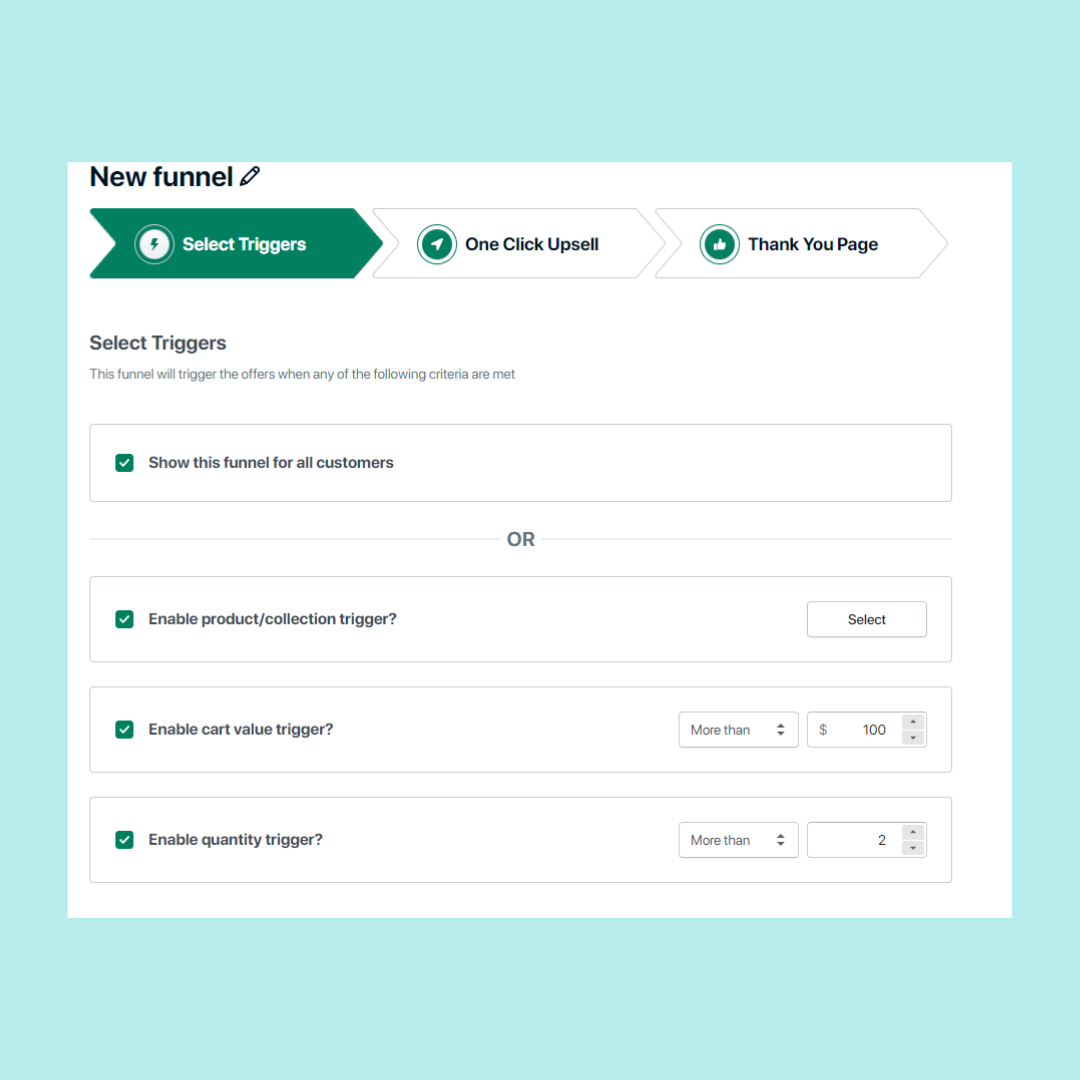
AfterSell’s segmentation and trigger features are where we think the funnel editor could use the most improvement.
While there are options to show offers based on item quantities, collections, and cart values, this list doesn’t include some vital triggers.
Options like device type or past purchase behavior can be invaluable triggers for high-performing stores but are lacking in this app.
Overall, while it’s easy to set up the triggers in AfterSell, it falls short in the amount of triggers offered.
Reviewing and optimizing your funnels according to customer data is the cornerstone of a high-profit strategy.
And to do that effectively, you’ll need all of the metrics you can get.
Revenue, AOV, conversion rates, etc.
When it comes to analytics- the more metrics and depth, the better.
So let’s compare the analytics features of both apps.
Here’s the dashboard for ReConvert:

ReConvert’s analytics suite makes it easy to get a grand overview of your whole store.
Virtually all of the metrics you need are here- Including the returns you’re getting purely from ReConvert as opposed to the store as a whole so can tell if you’re getting enough return on investment.
Upsell.com helps you increase AOV with targeted offers across the full shopping journey, from product and cart to checkout, post purchase, and beyond.
AfterSell’s analytics suite is comparable to ReConverts.
They both offer similar graphs, metrics, and data around your store, so there’s no “clear winner” in this department.
Reconvert has integrations with 14+ of the best Shopify apps out there.
Some of the most popular on that list are Mailchimp and Klaviyo, which allow merchants to collect birthdays and automate email marketing sequences.
There’s also Wiser Recommendations, which automates and personalizes product recommendations for each customer that visits the Shopify store. Though even that list is far from comprehensive. (and it’s still growing!)
Easy integrations mean that you’ll spend less time configuring apps to work well together and more time optimizing your funnels for maximum profit.
As of writing this post, AfterSell only offers one integration, as stated on their Shopify page.
We’d like to see a few more integrations with large apps in the eCommerce space to make it easier for big merchants to save time and resources.
The more time you have to spend on making your apps work together, the less time you’ll be spending on the directly profit-generating tasks.
Designing a good-looking store is already no easy feat; it takes a lot of work.
And when you’re working with multiple plugins, widgets, and apps- you’ll have to redo all of that design work for each one of them.
Running a slightly different theme for your BFCM promotions? You’ll need to tinker with each and every widget so they match.
Or, you would have to tinker with them, if you weren’t using ReConvert.
ReConvert comes stock with the Magic Designer.
Magic Designer syncs your design and style options across all the widgets and pages on your store… automatically.
No more having to waste hours manually matching each section of your site, the Magic Designer can do it for you.
Both apps follow the same procedure for installation.
Download the app to your store, click enable, and then navigate to the settings to switch your default checkout app.
Overall, the processes are similar enough that we’d consider this section to be a tie.
Pre-made templates are useful because they make for excellent examples or starting funnels.
They’re tried & true, so you can bet that even if they aren’t the most optimized your store can get, they’ll still make up for their ROI by a good margin.
And when it comes to today’s matchup, ReConvert is the only app that provides these premade templates for users.
One of ReConvert’s many strengths is how easy it is to design compelling upsell funnels for Shopify merchants.
ReConvert’s UI uses simple drag & drop features to help keep the whole process intuitive, as well as automatic optimization for your campaigns as time goes on.
This means that you can view each funnel in a visual, top-down manner that makes it easy to understand and edit each step.
And once the funnels have been built, it’s easy to see what they look like with ReConvert’s preview feature.
AfterSell’s UI is easy to use and intuitive, if not a little oversimplified.
Overall, it’s hard to get lost in the menus of AfterSell- each option and branch is easy to find and well-organized.
With that being said, the simplicity detracted from the depth at times, and we found the funnel editor to be a bit more limiting than a few of the alternatives on the app store.
Customer Support is one of the most critical components of an upselling app.
If something goes awry on a shop that’s moving product fast, near-instant responses aren’t just a luxury, they’re a necessity.
When it comes to customer support, ReConvert covers the whole nine yards.
A phone line, 24/7 live chat, an email ticket system, and a whole FAQ section.
And with an average response time of just 4 minutes, there’s something for everyone, even if they need ultra-quick support.
AfterSell offers in-app customer support, with an average response time of under 3 hours.
They also offer help videos in the app as well to guide customers through some of the setup processes.
Overall, there’s a bit to be desired in the customer support department for AfterSell.
ReConvert gives merchants the power to optimize their Shopify stores to their full potential with advanced segmentation and various options when it comes to widgets.
The app also saves time and provides quality-of-life features like the Magic Designer, which help to create a cohesive, on-brand storefront without hours of hassle.
While AfterSell is easy to use and understand, it lacks some of the cornerstone options and segmentation features that are necessities for larger stores.
Taking that into consideration as well as ReConvert’s higher rating and faster customer support- ReConvert wins todays comparison.
Want to try out ReConvert for your own store?
Click here to start your free trial of ReConvert today.
MarketingYou don’t need a huge budget to get your business or brand noticed. Our online marketing ideas for small businesses are designed to maximize ROI.
 Marketing
eCommerce marketing automation allows you to free up time, provide a better experience, and ultimately, make more sales. Discover 10 simple, but proven eCommerce marketing automation examples you can implement to take your store to the next level.
 Product
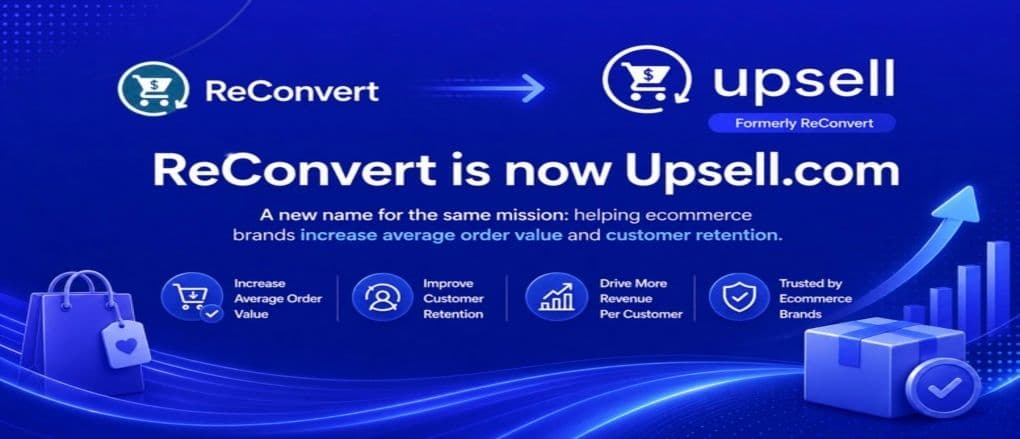
ReConvert has officially become Upsell.com. Here’s what’s changed, what stays the same, and what this means for your Shopify store.
Get eCommerce insights that convert
One email a month, practical strategies on conversion, AOV, retention, and customer experience.